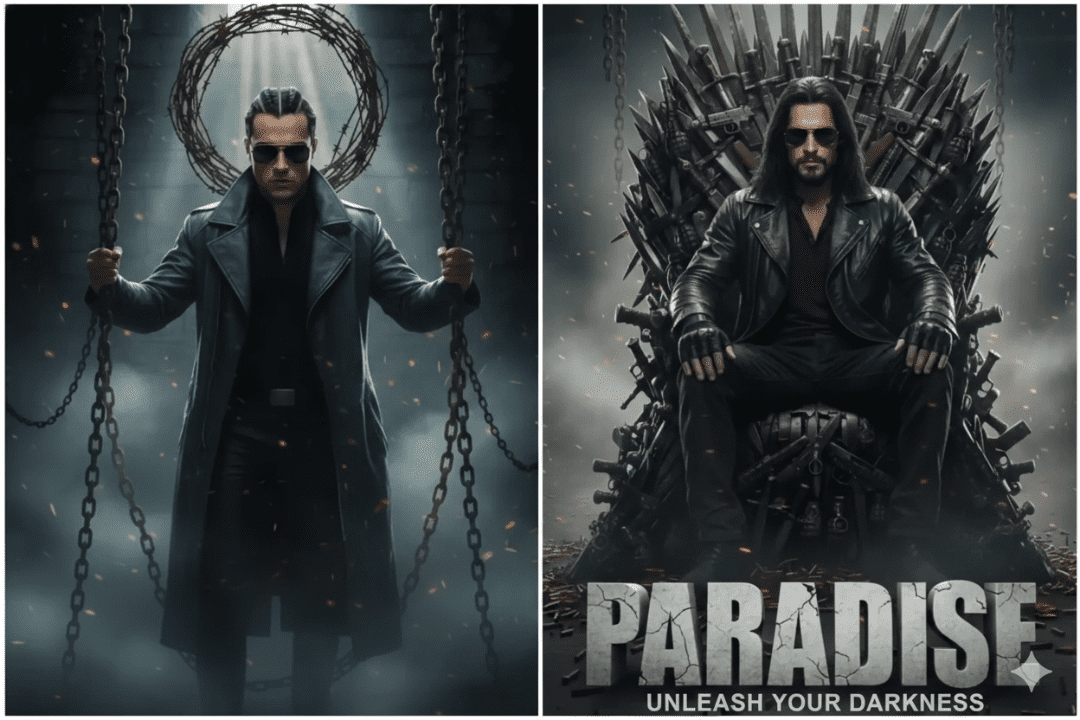
Discover 10 stunning Paradise Movie Poster Photo Editing Prompts for AI tools and Photoshop. Create breathtaking tropical, cinematic, and dreamy poster effects with these ready-to-use prompts.
Are you a graphic designer, photo editor, or creative enthusiast looking to craft cinematic paradise-themed movie posters? Whether you’re using AI image generators like Midjourney, Adobe Firefly, or Stable Diffusion — or working inside Photoshop — the right prompt can make all the difference between a generic design and a jaw-dropping masterpiece.
In this article, we’re sharing 10 Paradise Movie Poster Photo Editing Prompts that will help you create stunning, professional-quality visuals with ease. These prompts are carefully crafted to evoke lush tropical landscapes, golden-hour skies, dramatic lighting, and cinematic depth that scream paradise.
Let’s dive in! 🌴
Why Paradise Themes Are So Powerful in Movie Posters
Paradise imagery — turquoise oceans, golden sunsets, lush palm forests, and dreamy skies — carries a universal emotional appeal. It represents escape, freedom, romance, and adventure. Movie posters that leverage paradise aesthetics immediately grab attention and evoke a powerful emotional response from viewers.
From blockbuster action films set on tropical islands to romantic dramas and exotic thrillers, paradise-themed posters are timeless in the film industry. By mastering the right editing techniques and prompts, you can replicate that Hollywood-level quality in your own creative projects.
10 Paradise Movie Poster Photo Editing Prompts
1. Tropical Sunset Silhouette Poster
Prompt:
“A cinematic movie poster featuring a lone figure standing on a white sandy beach at sunset, silhouetted against a dramatic sky of orange, pink, and deep purple hues. Palm trees frame the sides. Volumetric god rays pierce through the clouds. Ultra-realistic, 8K resolution, wide-angle lens, Hollywood blockbuster style.”
Editing Tips: Use a warm color grade in Lightroom or Camera Raw. Apply a gradient overlay from orange to deep magenta. Add a subtle lens flare in Photoshop for authenticity.
2. Underwater Paradise Fantasy Poster
Prompt:
“A surreal movie poster showing a beautiful woman submerged in a crystal-clear tropical ocean, sunlight filtering through in shafts of blue and teal. Colorful coral reefs and exotic fish surround her. Cinematic underwater photography aesthetic, dreamy bokeh, 4K, vibrant color palette.”
Editing Tips: Enhance the blue-green tones using Hue/Saturation adjustments. Add a soft glow effect and increase the clarity on coral details for depth.
3. Jungle Explorer Cinematic Poster
Prompt:
“A dramatic movie poster of a rugged explorer cutting through a dense, lush jungle. Rays of golden sunlight break through the tropical canopy above. Misty atmosphere, rich greens and earthy tones, cinematic color grading, epic composition, inspired by ‘Indiana Jones’ and ‘Avatar’, ultra-detailed.”
Editing Tips: Use a green-teal LUT for the cinematic jungle feel. Add atmospheric haze using a soft airbrush layer set to Screen mode. Increase contrast and shadows for drama.
4. Deserted Island Survival Poster
Prompt:
“A gritty, cinematic movie poster of a lone shipwreck survivor on a deserted tropical island. Dark stormy sky contrasting with the lush green island paradise below. Tattered clothing, desperate expression. Moody, high-contrast color grade, reminiscent of ‘Cast Away’, photorealistic, 8K.”
Editing Tips: Apply a desaturated, cool-toned grade to the sky while keeping the island vibrant. Use dodge and burn tools to add drama to the subject’s face.
5. Romantic Paradise Couple Poster
Prompt:
“A romantic movie poster of a couple embracing on a secluded paradise beach during golden hour. Warm bokeh lights from tropical lanterns float in the background. Soft, dreamy atmosphere, pastel color palette of peach, gold, and soft lavender. Cinematic wide shot, soft film grain.”
Editing Tips: Add a warm pastel LUT and reduce saturation slightly for a nostalgic film look. Use a radial gradient to draw focus to the couple. Layer a subtle texture overlay for a printed poster feel.
6. Ancient Lost Paradise Poster
Prompt:
“A mystical movie poster depicting ancient stone ruins covered in lush tropical vines and glowing with an ethereal blue light. A cloaked figure stands at the entrance. Mysterious fog, twilight atmosphere, epic fantasy aesthetic, cinematic color grading in deep teals, greens, and gold, ultra-detailed.”
Editing Tips: Use Color Balance to shift shadows to teal and highlights to gold. Apply a particle brush to simulate drifting particles/dust in the air. Add slight chromatic aberration on the edges for a cinematic lens effect.
7. Paradise Aerial Drone View Poster
Prompt:
“An overhead aerial movie poster shot of a tiny tropical island surrounded by breathtaking turquoise and deep blue waters. The island is lush green with a white sand beach. One small boat anchors nearby. Ultra-crisp drone photography style, vibrant tropical color palette, 8K resolution.”
Editing Tips: Boost vibrancy on the ocean blues and greens. Use Curves to create a high-contrast, punchy look. Add a slight vignette around the edges to frame the island.
8. Neon Paradise Night Poster
Prompt:
“A cyberpunk-meets-tropical movie poster featuring a neon-lit beach bar at night in a paradise city. Vibrant neon signs in pink, purple, and teal reflecting on wet sand. Palm trees with glowing fairy lights. Futuristic yet tropical atmosphere, inspired by ‘Blade Runner’ meets Miami Vice, ultra-detailed.”
Editing Tips: Use the Color Lookup table for a neon-cyberpunk grade. Add chromatic aberration and bloom effects on all light sources. Create a rain/wet floor reflection using a distort filter.
9. Paradise Horror Thriller Poster
Prompt:
“A terrifying movie poster combining paradise and horror — a beautiful tropical beach under a blood-red moon. Dark, twisted shadows of palm trees. A shadowy figure lurks in the water. Eerie, unsettling atmosphere, deep red and dark teal color grade, high contrast, cinematic horror aesthetic.”
Editing Tips: Shift sky tones to deep crimson using Hue/Saturation. Dramatically increase the shadows and reduce midtones for an ominous look. Add fog or smoke brushes near the water line.
10. Paradise Lost Apocalyptic Poster
Prompt:
“An epic apocalyptic movie poster showing a once-beautiful tropical paradise now in ruins. Crumbling resort buildings overtaken by jungle vegetation, a smoky ash-filled sky, and an empty overgrown beach. Post-apocalyptic atmosphere, gritty desaturated tones, inspired by ‘The Last of Us’, ultra-realistic, cinematic.”
Editing Tips: Desaturate the image slightly and add a dusty orange-brown tint. Layer cracked texture overlays set to Multiply blend mode. Add smoke or ash particle brushes for atmosphere.
Pro Tips for Using These Paradise Movie Poster Prompts
Getting great results from these prompts requires a little more than just copy-pasting. Here are some insider tips to maximize your output:
Be Specific with Details: The more specific your prompt, the better your result. Mention lighting direction, color palette, lens type, mood, and any cinematic references.
Layer Your Editing: Whether in Photoshop or Lightroom, work in adjustment layers so you can fine-tune each element independently without destroying your base image.
Use High-Quality Stock Photos: Start with a high-resolution base image (at least 3000px wide) to ensure your final poster looks sharp and professional.
Study Real Movie Posters: Before editing, spend 10 minutes studying actual Hollywood movie posters in your desired genre. Notice how they use lighting, typography placement, and color grading.
Experiment with Blending Modes: Overlay, Screen, and Soft Light blend modes are your best friends when layering textures, color grades, and light effects.
Best Tools for Paradise Movie Poster Editing
To make the most of these prompts, here are the top tools professionals use:
Adobe Photoshop — The industry standard for photo manipulation, compositing, and typography design. Best for full control over every element of your poster.
Adobe Firefly — Adobe’s AI image generator, now deeply integrated into Photoshop, is perfect for generating paradise backgrounds and assets from prompts.
Midjourney — One of the most powerful AI image generators available. Ideal for quickly generating stunning paradise-themed cinematic scenes.
Stable Diffusion — A free, open-source AI generator that gives you full control. Great for customized paradise poster imagery.
Lightroom Classic — Perfect for color grading your base images before compositing in Photoshop.
Canva Pro — A more beginner-friendly option that still offers powerful poster templates and design capabilities.
How to Structure Your Paradise Movie Poster
A great movie poster is more than a beautiful image. Here’s the key anatomy of a professional poster layout:
Main Image / Hero Shot — This is your paradise scene. Should take up 60–80% of the poster.
Title Typography — Bold, cinematic fonts placed in the lower third or center. Consider a gradient or metallic text effect.
Tagline — A short, punchy one-liner placed above or below the title. Keep it evocative.
Top Billing — Fictional or real actor/creator names along the top, in smaller type.
Credits Block — A small block of fine print at the very bottom (optional for mockups).
Frequently Asked Questions
Can I use these prompts for commercial projects? Yes! These prompts are completely original and free to use. However, if you’re using AI-generated images for commercial purposes, always check the terms of service of the specific AI tool you’re using.
What resolution should my paradise movie poster be? For print, aim for at least 300 DPI at the final output size (typically 24×36 inches for a standard movie poster). For digital use, 72–150 DPI at 1920x2880px is sufficient.
Do these prompts work for video thumbnails too? Absolutely. These prompts are versatile and work beautifully for YouTube thumbnails, Instagram posts, and digital banner ads — not just traditional print posters.
Final Thoughts
Whether you’re a seasoned graphic designer or just starting your creative journey, these 10 Paradise Movie Poster Photo Editing Prompts give you a powerful launching pad for stunning, cinematic designs. From romantic sunsets to horror thrillers and apocalyptic visions, paradise is a theme rich with creative potential.
Save this article, bookmark your favorite prompts, and start experimenting today. The more you practice with these prompts and editing techniques, the faster your skills will grow — and the closer you’ll get to creating poster-worthy visuals that rival Hollywood itself.
Happy editing! 🎬🌴